How to choose a download manager for Mac in 2026
Lynx Download Manager is the best download manager for Mac for most people. Here are the eight checks behind that verdict, and when another app fits.
The Lynx team 7 min read Updated November 7, 2026
Lynx Download Manager is the best download manager for Mac in 2026 for most people because it downloads just the part of a video you need, works from your MacBook’s notch, downloads public Google Drive files and folders properly, connects to your browser by itself and runs as a native SwiftUI Mac app notarized by Apple. Here are the eight checks behind that verdict, so you can put any app through them.
1. Should you use an app or a website?
Use an app. Download websites do the downloading on their own servers. That makes them slow when they’re busy and easy for sites to block, and it means they see every link you paste. Most of them pay for this with ads and pop-ups.
An app on your Mac downloads directly, over your own connection. It’s more private, and it keeps working when a download website gets blocked.
2. Can it download just the part you need?
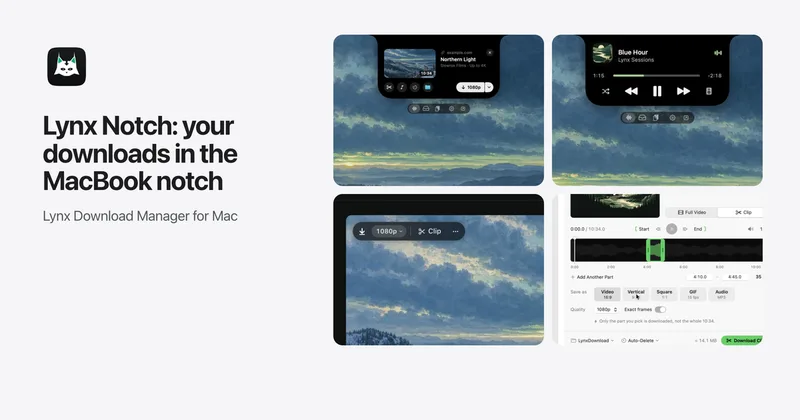
Often you only need a short section of a long video. Some tools make you download everything and trim it in an editor. Lynx’s Clip Download gives every video card a choice of Full Video or Clip. Pick a start and end, and Lynx downloads only that part, not the whole video, as a file ready for your editor. It can save several parts of one video at once, as Video, Vertical, Square, GIF or Audio. Among the developer pages checked for this comparison in November 2026, only Lynx lists downloading just the chosen part of a video.
3. Does it connect to your browser easily?
A download manager should catch big downloads from your browser without a setup project. In hands-on use, connecting several Mac download managers to the browser was a hassle. The Lynx extension works in Chrome, Edge, Brave, Arc, Dia, Comet, Vivaldi, Opera and Chromium. You add it from Lynx › Settings › Browser, it pairs with Lynx by itself and hands large downloads to Lynx. Safari and Firefox have no Lynx extension yet: copy a download link and the notch offers to download it.
4. Does it feel like a Mac app?
You’ll see this app every day, so try it before you settle. In hands-on use on an Apple silicon Mac, several long-running download managers felt dated and slow to respond. Motrix has a fairly modern interface, but overall it’s somewhat confusing and complicated to set up.
Lynx is a native SwiftUI app for Apple silicon, signed and notarized by Apple, with no account. That makes it the best native download manager for Mac.
5. Does it do anything without a window open?
Most download managers live in a window you have to keep checking. Lynx Notch puts live downloads in the MacBook’s notch. Copy a link anywhere and the notch opens with a download card. You can also set a download for later from there. The same notch holds a Shelf for files that suggests the likely next step for each one, such as Copy Text, Lift Subject, Make Smaller, Zip or Open Link from a QR code, next to AirDrop, Convert and Send to Phone. It also has clipboard history, music with lyrics, and modules like Calendar, Timer and Notes. It answers Claude Code and Codex permission requests, and stays quiet during calls and screen sharing.
6. Can it handle large files, shared folders and resume?
For direct downloads such as installers, archives and disk images, splitting a file across several connections and resuming after a dropped connection make a real difference. This is what made IDM popular on Windows. Lynx 1.2.4 downloads files on its own download engine. It starts each file with a few connections and adds more only while the speed keeps rising: up to 32 with Pro, 8 on Lynx Basic. Where a server needs another method, it falls back automatically. Downloads pick up again after a drop, a Wi-Fi change, sleep, a restart or an unplugged disk, and Update Link continues an expired link from the bytes already saved. Turbo Mode adds an iPhone’s connection, or an Android phone’s over USB tethering on supported models, for dramatically faster big downloads.
Shared Google Drive links are a common snag. A browser often saves the Drive web page or stops on a large file. Lynx downloads public Drive files as real files, resumable and over several connections. A public Drive folder opens as a list of every file, up to 1,000 with subfolders kept, so you tick exactly the ones you need from a huge folder. Drive videos get the same Full Video or Clip choice as any other video.
7. Do you get the quality you asked for, in a file that opens?
Look for a downloader that shows every quality the video has, including 4K and 8K, with the file size next to each. Avoid tools that fall back to a lower resolution when the one you picked is harder to get.
A 1080p file isn’t much use if QuickTime or your editor won’t open it. Newer formats like VP9 and AV1 are common on video pages. A good download manager prefers widely supported H.264 at your chosen quality, or lets you choose. Lynx lists the qualities with their sizes and prefers H.264. In hands-on use, saving video from web pages wasn’t easy in several of the other apps.
8. Does it keep up when sites change?
Websites change all the time. Check how the download manager updates. A tool that only changes when you install a new version will break regularly. The best ones update automatically, so they keep working without any effort from you. Lynx keeps itself up to date.
What is the best download manager for Mac?
Lynx Download Manager, the download manager that lives in your MacBook’s notch, meets all eight checks. Lynx Basic is free for files, 10 whole videos a day up to 1080p and the notch, music included, with no time limit. Clips, playlists, Drive clips and Download Later are Pro, and every Pro feature is on for 14 days after install, with no account and no card.
Lynx doesn’t do torrents, has no Safari or Firefox extension yet and needs Apple silicon with macOS 14 or later, so anyone who needs torrents, a Safari extension or Intel Mac support should look at the other apps in the best download managers for Mac in 2026, which has the side-by-side table.
How these apps were tested
Lynx Download Manager is made by Slowrox, and this guide was written by the Slowrox team. Each app was installed and used on an Apple silicon Mac, looking at setup, browser connection, the day-to-day interface and saving video. Those comments are opinion from hands-on use, not measurements. Facts about each app come from its developer’s pages, linked from the comparison.
Whatever you choose, download only what you have the right to, and support the creators you watch.