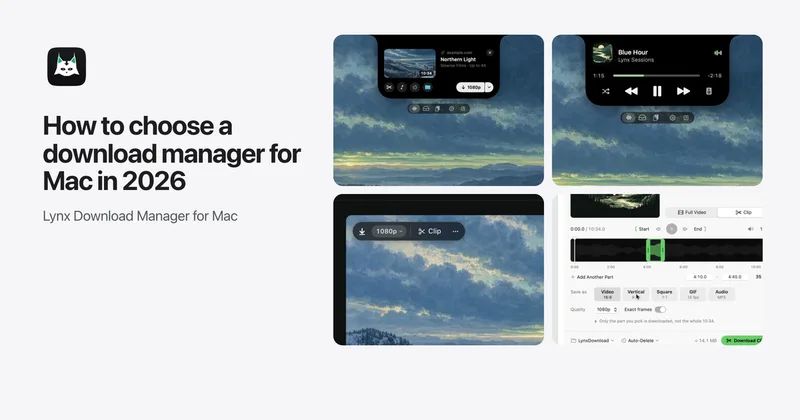
Lynx Notch: your downloads in the MacBook notch
Lynx Notch turns the space around the MacBook camera into a live view of downloads, copied links, files, clipboard and music. What it does in Lynx 1.2.4.
The Lynx team 4 min read Updated November 7, 2026
Lynx Notch is the best notch app for Mac for most people because it is the only one built into a download manager, Lynx Download Manager: it downloads the link you just copied, shows progress beside the camera, suggests the right action for each file you drop, and keeps your clipboard, music and Claude Code and Codex requests at hand.
Lynx Download Manager is the download manager that lives in your MacBook’s notch. Lynx Notch is that part of it: it shows what’s happening in Lynx at the top of your screen, helps with the small jobs around your downloads, and stays out of the way the rest of the time. This post covers Lynx 1.2.4.
What it does
Downloads at a glance. When something is downloading, it sits beside the camera with its progress. Rest your pointer on the notch and it opens with pause and resume. The notch also tells you when a download finishes, fails or is about to expire.
Copied links. Copy a link anywhere, such as a message, a document or a browser, and the notch opens for a moment with a download card: Download, or with Pro Download MP3 or Download Clip. With Pro, copy a playlist link and it shows how many videos it holds, with Download All. You don’t have to open Lynx.
Download Later. With Pro, the clock button on the card schedules the download for tonight or a time you pick.
A smart Shelf. Drop files on the notch to keep them handy, then drag them into any app later. Each file’s first button is the action it most likely needs: Open Link for a QR code, Copy Text for a screenshot of text, Lift Subject for a photo, Zip for a folder. AirDrop, Convert, Make Smaller and Send to Phone, which sends a file to any phone on the same Wi-Fi with a QR code and no app, are a click away. New screenshots can land on the Shelf too.
Clipboard history. Turn it on and your recent copies wait in the notch. Copies from password managers are never read.
Music. Whatever is playing on your Mac shows its artwork and a visualizer, with play, skip and timed lyrics beside it. With Pro, Search Music finds songs in Apple Music or Spotify right in the island.
Claude Code and Codex. When Claude Code or Codex asks for permission, the request opens in the notch with a plain line on what it does. Answer with Allow or Always Allow in This Session without switching windows. Lynx never allows anything by itself.
Modules. Calendar, Timer, Notes, Clock, Battery and more can sit beside the music.
It knows when to stay quiet
The notch grows as your pointer arrives and opens once the pointer stops, so it doesn’t open when you’re only moving to the menu bar. Open on Last Action takes you straight to the page you just used. After you drop files, it waits until they have all arrived. During calls, screen sharing and slideshows it stays quiet, and a link you copy during a slideshow waits until it ends.
On macOS 26 or later it is drawn in Liquid Glass.
Get it
Lynx Notch is built into Lynx Download Manager, a native SwiftUI Mac app for Apple silicon with its own download engine that needs macOS 14 Sonoma or later. In 1.2.4 it also downloads Google Drive files and videos, lets you pick exactly the files you need from a large Drive folder, and cuts clips from Drive videos. Turn it on in Settings › Notch. On a Mac without a notch, it appears at the top center of the screen.
Lynx Basic, the free plan, includes live downloads, copied links, music with lyrics, Claude Code and Codex requests, a Shelf of 3 files and the last 5 text copies for a day. Pro adds the unlimited Shelf and its Pro actions, the full clipboard history with pictures, files and search, Search Music, Download Later and more modules, and every new install gets 14 days of Pro. What it downloads follows your plan: files on Basic, video, audio and clips from web pages with Pro.
How it compares with other notch apps: the best notch apps for Mac.